The first time my car parallel-parked itself, I was standing on the pavement with my arms crossed and a very specific expression on my face. The kind you make when you’re simultaneously impressed and a little offended that a machine just did something better than you’ve been doing for fifteen years.
It found the gap, checked it, reversed in, corrected twice, stopped perfectly straight. Took about twelve seconds. I’ve spent longer than that arguing with a kerb.
That was a 2023 model. By 2026 the self-parking thing barely registers as a notable feature anymore — it ships with heated seats and Apple CarPlay as standard. What’s actually changed is how deep the technology goes now, how much of it runs in the background you never see, and how little of it most people understand about what their car is doing while they’re just… driving.
I’ve been writing about cars and consumer tech for a few years, tested a fair bit of what’s out there. Some of it is genuinely useful. A fair amount is marketing dressed up as innovation. Here’s the honest breakdown — not the press release version.
What “Smart Car” Actually Means
The phrase gets used loosely enough that it’s worth sorting out before anything else.
It doesn’t mean self-driving. It doesn’t necessarily mean electric, though a lot of the most interesting smart features show up in EVs first — mostly because software-defined platforms are easier to build from scratch than to retrofit onto a century-old mechanical architecture. And it doesn’t mean complicated. The best implementations are the ones you barely notice until something goes wrong and you realise the car quietly sorted it.
A smart car, in plain terms, is a vehicle with digital systems that assist you in real time, connect to networks and devices outside the car, learn from how you drive over time, or update itself after you’ve already bought it. Often some combination of all of those. That last one — updating itself — is newer than most people realise, and it’s probably the thing that’s changed the ownership experience most fundamentally.
The Part That Changed My Thinking: Your Car Gets Better While You Sleep
I drove a friend’s Rivian last March. She mentioned, almost as an aside, that the range estimation had gotten noticeably more accurate over the past few months. Not because she’d had it serviced. Not because of anything she’d done. It just… improved. On its own. Overnight.
That’s an OTA update — over-the-air — and it’s the feature I keep coming back to when I try to explain how different modern cars are from what came before.
Traditional cars were essentially frozen at the moment they left the factory. Whatever problems existed in the software, whatever calibration was slightly off, whatever feature they hadn’t quite finished in time for launch — that was it. You lived with it or you paid a dealer a couple hundred pounds to plug into the car with a laptop and fix it. Now most manufacturers push those fixes wirelessly, usually overnight when you’re not using the car.
Tesla normalised this years ago and others have followed, some better than others. It’s not just bug fixes either. Porsche once pushed an OTA update that measurably improved the Taycan’s DC fast charging performance months after the car had already shipped. That’s not a small thing — that’s a significant technical improvement delivered to cars already sitting in people’s driveways, for free, without anyone making a service appointment.
The caveat worth knowing: not every manufacturer has figured out how to do this well. Some push updates that break things that were working fine. There’s no rollback option if an update makes your regenerative braking feel weird or changes the interface in a way you hate. Before buying any specific model, it’s worth spending ten minutes in the owner forums looking at the OTA update history — the quality of those updates tells you more about a manufacturer’s software culture than any press release does.
The Safety Features You Probably Use Without Thinking About Them
There’s a whole category of smart car technology that most drivers interact with daily without really registering it. Lane-keeping, automatic emergency braking, blind spot alerts, the little light that comes on in the mirror when someone’s alongside you in traffic. These things have been on mid-range cars for four or five years now and they’ve become like seatbelts — you notice their absence more than their presence.
Automatic emergency braking is the one worth pausing on because the improvement in the last two years has been significant. Earlier systems were calibrated conservatively to avoid false positives, which meant they sometimes didn’t intervene quickly enough to actually prevent low-speed collisions. Newer systems are faster and smarter — they cross-reference camera data, radar, and speed to make better decisions about when to act. I’ve watched one activate in a car park when a trolley rolled out unexpectedly and the driver wasn’t looking. The car stopped. The trolley bounced off the front bumper anyway, but it would’ve hit harder without the brake.
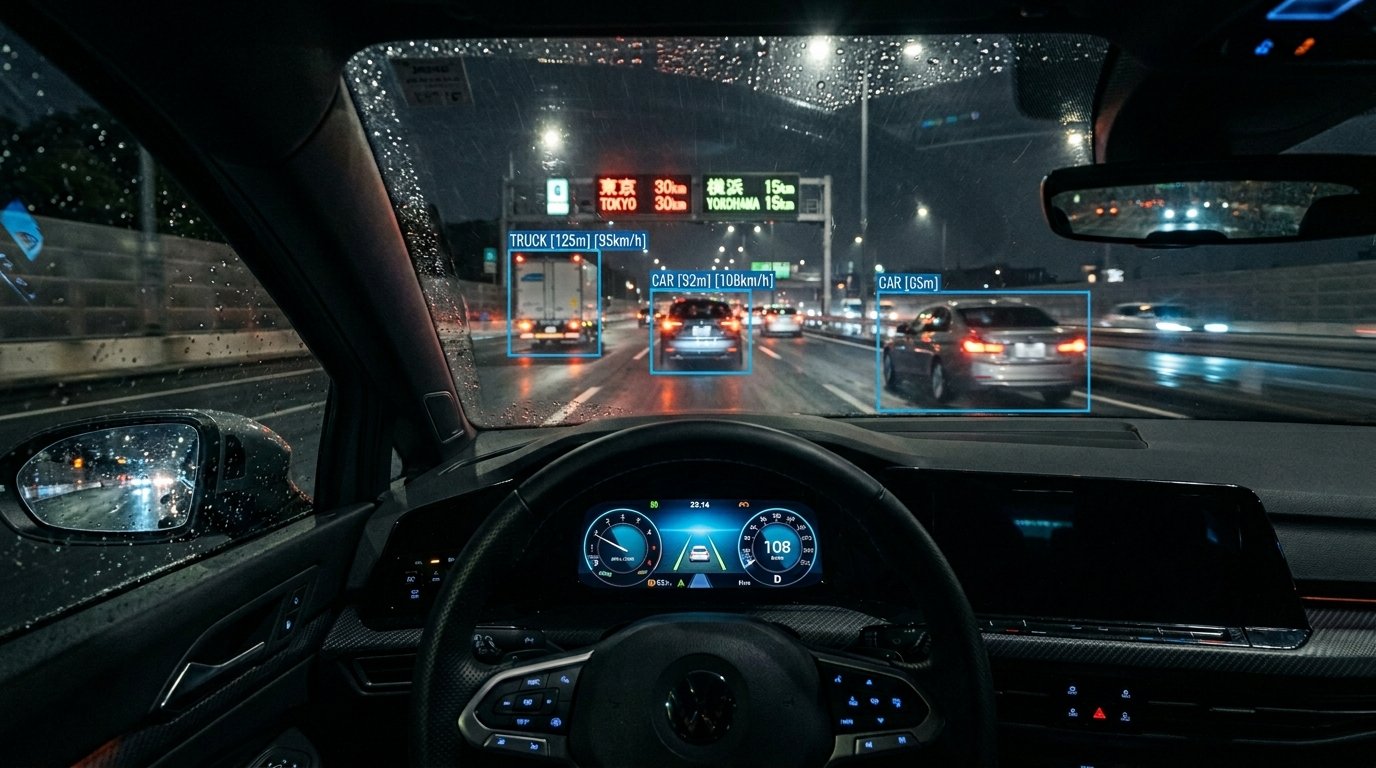
The more interesting question in 2026 is the hands-free driving stuff. Tesla’s Autopilot and GM’s Super Cruise are the two most people will actually encounter in real life. They feel unreal the first time you use one on a clear motorway — the car just… steers itself. Maintains gap. Changes lanes. It’s very calm and very strange.
The practical difference between Autopilot and Super Cruise is worth knowing before you assume they’re the same. Autopilot uses cameras and requires you to occasionally apply a little pressure to the wheel to confirm you’re still paying attention. Super Cruise uses GPS-mapped road data and an infrared camera that tracks where your eyes are pointing — you don’t touch the wheel, but it needs to be able to see your face. If you look away for too long it starts escalating alerts until eventually it pulls you over safely. Different philosophies. Both work well when you use them as intended.
The thing I keep having to say out loud: Level 2 driver assistance means the driver is still legally and physically responsible for everything that happens. The car helps. It doesn’t drive. That distinction gets blurred in the marketing and it’s caused real accidents when drivers treated a Level 2 system like a chauffeur and stopped paying attention. The technology is good within its stated limits. Outside those limits is where it fails.
The Connected Stuff — Some of It Useful, Some of It Looking for a Problem to Solve
Your car is basically a networked device now. It’s connected to the manufacturer’s servers, potentially to your home systems, to cloud navigation data that updates in real time, and in some cases to other vehicles on the road.
The useful end of that is pretty tangible. Real-time traffic that knows about accidents before you’d spot them. Navigation that knows your battery level and your route and books a charging stop for exactly the right moment without you asking. Software that pre-conditions the car — gets it to the right temperature, charges the battery to the right level — based on a departure time you set the night before. I used this consistently last winter and it genuinely changed the morning routine. Getting into a warm car that’s already at 80% charge instead of a freezing one at 62% sounds small. Over three months of early starts it adds up.
Mercedes’ MBUX assistant will read your calendar and factor in expected traffic when suggesting when you should leave. The Hyundai Ioniq 9 can communicate with your home’s smart systems to pre-cool the cabin when solar generation is at peak. Rivian‘s navigation syncs with your schedule so it knows where you’re likely going before you input it.
Whether all of that integration is something you want is a separate question. The car knowing your schedule, your habits, your regular routes — that data is collected and stored, and not every manufacturer is equally transparent about what happens to it next. A 2023 Mozilla Foundation report, which looked at data practices across all major car brands, found that every single one failed their privacy assessment. Most collected more data than necessary. Most shared it with third parties. Most gave drivers limited ability to actually opt out of collection. The situation has improved since then but it hasn’t been resolved. There’s usually a privacy settings panel somewhere in the infotainment system — most people never open it. Worth ten minutes of your time when you first pick up the car.
The Car That Knows You’re Getting Tired Before You Do
The personalisation side of smart car AI has two layers, and they’re worth separating because one is much more mature than the other.
The first layer is straightforward: your seat position, mirror angles, climate settings, preferred driving mode, favourite radio stations — all saved to your driver profile, loaded automatically when you get in. You sit down, the car recognises you, everything is how you left it. This has worked reliably for a few years and most people take it for granted pretty quickly.
The second layer is the actually interesting one. Driver monitoring systems — cameras pointed at your face rather than the road — that track eye movement, blink rate, head position, and use that to infer whether you’re alert or fading. I tested this in a 2026 Hyundai and was genuinely surprised by how well it was calibrated. At normal tiredness it didn’t do anything annoying. When I deliberately tried to simulate drowsy behaviour — looking away repeatedly, responding slowly to inputs — it brought up a coffee cup icon and suggested a rest stop. Didn’t alarm. Didn’t nag. Just suggested, clearly enough that you’d notice but not in a way that felt like surveillance.
Predictive maintenance sits in this category too. The car monitoring its own tyres, brakes, battery cells, and fluid levels is old technology. What’s newer is the AI layer that cross-references those readings against your recent driving, your typical routes, and historical patterns for that component, and flags problems before you’d notice any symptom. A 2025 Ioniq 5 I was running flagged a slow pressure loss in one tyre four days before I’d have noticed it on the dashboard. The difference between knowing on a Tuesday afternoon at home and knowing on a Saturday on a motorway is the difference between a minor errand and a fairly stressful situation.
The Interior: What Happened to All the Buttons
There’s a small but satisfying story arc in how smart car interiors have evolved over the last five years, and it involves manufacturers making a mistake and then quietly correcting it.
The mistake was the all-touchscreen interior. For a few years the dominant design philosophy was to remove every physical control and put everything on a screen. It looked clean. It photographed well. Owners hated it. You had to navigate two or three menus to change the temperature. Adjusting the fan speed while moving required the same cognitive load as changing lanes. People complained loudly enough that by 2024 manufacturers started listening.
The better cars in 2026 use a hybrid approach. Large central display for navigation and media. Physical or always-visible controls for the things you adjust while moving — temperature, fan, volume. Hyundai kept actual buttons below the screen on the Ioniq 9. BMW brought back haptic controls after years of touch-only. Rivian uses a large screen with physical rotary dials alongside it, which sounds like a compromise but works better in practice than either extreme.
Voice control is what’s actually made the biggest difference though. Google’s built-in system — in the Equinox EV, the Volvo EX90, and a growing list of others — understands natural speech rather than requiring specific commands. You say “I’m cold” and it turns up the heat. You say “find me a charging station that’s not busy” and it does that. It doesn’t always work perfectly, I’ve had it mishear me on noisy roads more than once, but the failure rate is genuinely much lower than it was even two years ago. That matters because voice control is, in theory, the safest way to interact with the car while moving. When it works reliably, it becomes the first thing you reach for.
Things People Get Wrong When They First Own a Smart Car
The most common one, by a distance, is using the driver assistance features in conditions they weren’t designed for. These systems work well on motorways with clear lane markings and decent weather. On country roads with worn paint, in heavy rain, in complex junctions with unusual geometry — they’re much less reliable. The car doesn’t tell you when it’s struggling. It either works or it quietly stops working, and you don’t always notice which mode you’re in. Knowing the specific limits of your specific car’s ADAS system matters. The manual is usually clear about this. Reading it is less exciting than it should be.
People also tend to ignore OTA update notes, which is understandable because they arrive at inconvenient times and look like software changelog text. But updates sometimes change things you care about — the feel of regenerative braking, the sensitivity of the lane assist, the default behaviour of Autopilot or equivalent. Spending two minutes reading the update notes when they arrive means you’re not confused by changes you didn’t expect. The notes are usually in the manufacturer’s app.
Setting up the driver profile is the third thing people skip. The personalisation features are only as good as the initial setup. Seat, mirrors, climate defaults, preferred driving mode, voice assistant language, navigation home and work addresses. It takes maybe half an hour the first week you own the car. If you don’t do it, the “smart” personalisation never works correctly and you end up blaming the technology when the real issue was that you never told it anything about yourself.
The Reasonable Way to Think About All This
The term “smart car” sounds like it implies some coherent, unified intelligence running the whole vehicle. It doesn’t. What it actually means is a collection of separate systems — some genuinely clever, some more useful than others — all running at the same time, most of them without requiring you to do anything.
The emergency braking is running. The tyre pressure monitoring is running. The navigation is learning your routes. The driver monitoring camera is watching your face. You don’t activate any of these. They’re just on.
The parts worth actively engaging with are the configuration ones — setting up your profile, learning the voice commands, checking the privacy settings, understanding what your ADAS system actually does versus what you might assume it does. Those are finite tasks. An hour spread across the first week of ownership, not a permanent project.
Everything else is the car running in the background, quietly doing things you’d otherwise have to do yourself or wouldn’t think to do at all. Which is, give or take, what useful technology is supposed to look like.
Feature availability varies by manufacturer, model, and trim. ADAS performance varies by road conditions and weather — check your vehicle’s manual for specific limits. Data collection practices vary widely by manufacturer; the privacy settings panel in your infotainment system is worth visiting when you first take ownership.